Digital storefronts live or die on visual impressions. When online shoppers scroll through endless inventory, a crisp product Photo serves as your store's primary handshake. We've seen visual media completely transform low-performing ad campaigns into steady revenue drivers. Modern shoppers make split-second choices. If your photos look flat or blurry, buyers bounce instantly to a competitor. That's why top sellers now lean on specialized design tools and AI product photo generation websites to create high-impact graphics that catch the eye and build instant credibility.
Table of Contents
- Why High-Impact Visuals Drive Sales in Modern E-Commerce
- 1. Build an Affordable DIY Studio Setup for Clean Shots
- 2. Master Camera Angles: How to Shoot a High-Converting Product Photo
- 3. Utilize Three-Point Lighting to Eliminate Unwanted Shadows
- 4. Optimize eCommerce Product Images for Speed and Crisp Detail
- 5. Standardize Post-Processing Workflows for Consistent Styling
- 6. Scaling Store Revenue with a Streamlined Visual Strategy
Shoppers can't touch or try on items through a glass screen. Visual assets work as a direct substitute for hands-on evaluation. High-resolution eCommerce product images answer hidden questions about texture, color, and build quality before the buyer even reads your description. Cheap imagery makes your storefront feel like an untrustworthy drop-shipping spot. High-impact photography signals premium value. When you present clean lighting and sharp focus, customers feel confident paying full price.

Poor photography destroys store margins through high return rates. When delivered items don't match listing pictures, disappointed customers demand full refunds. Clear, multi-angle shots set realistic expectations right away. In a recent Reddit seller discussion on visual conversion boosts, store owners reported a 28% jump in sales simply by upgrading flat camera shots to sharp renders and dynamic lifestyle views. High-contrast images hook mobile thumb-scrollers instantly. They eliminate visual friction so shoppers can envision owning the product without second-guessing their cart.
Upgrading catalog visuals used to demand expensive cameras and studio rentals. That balance has changed. Modern design software like Photoroom background removal software or Pebblely lets store owners erase distracting backgrounds and generate realistic studio scenes in minutes. You can combine solid camera techniques with smart software tools to build catalog visual assets that lower bounce rates, boost add-to-cart metrics, and lift overall revenue.
1. Build an Affordable DIY Studio Setup for Clean Shots
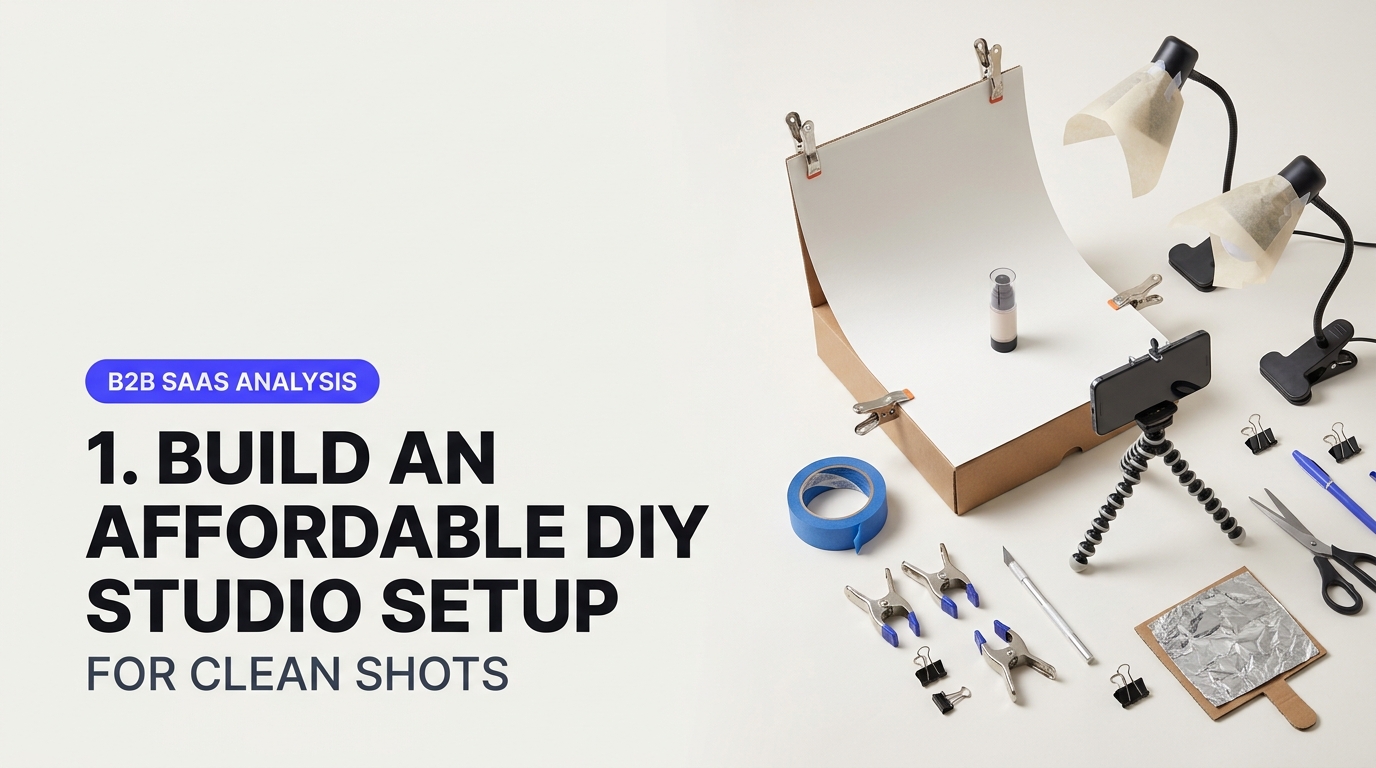
You don't need to rent an expensive studio to snap a great product Photo. Spending thousands of dollars on high-end commercial gear often wastes cash when you're launching or testing new catalog items. You can build a reliable desktop studio right on a kitchen table for under fifty dollars. It all comes down to controlling your environment, bouncing daylight, and locking your camera completely still.
Shooting sharp imagery requires basic physics, not expensive gadgets. When you control where light lands and how your lens holds position, your catalog photos look instantly elevated.

Essential Gear for a Low-Cost Tabletop Studio
Creating clean shots starts with three simple items. First, you need a seamless sweep background. If you place an item flat on a wooden table against a wall, the line where the wall meets the table creates a distracting shadow. A seamless sweep bends paper in a gentle curve. This curve acts like a smooth ramp, tricking the camera lens so the background looks infinite and clean.
- White Seamless Sweep Paper: Grab a roll of Savage Seamless Paper or heavy white poster board from a craft shop. Tape the top edge to a wall or backrest and let it roll smoothly down onto your table. Never fold or crease the paper.
- Foam Core Reflector Boards: Pick up two white foam boards from a local dollar store. Place them opposite your main light source. These cheap boards act like mirrors, bouncing soft light back into dark shadows so every small product detail stays clear.
- Black Fill Cards: Keep one black poster board nearby. When shooting reflective items like jewelry or glassware, holding up a black card creates dark contrast edges that define the object's outline.
Lock Down Stability with Sturdy Camera Mounts
Blurry photos kill sales instantly. Handheld shooting introduces micro-shake, especially when capturing close-up textures or shooting in moderate indoor light. You need a solid tripod or desktop clamp mount to hold your camera dead steady.
We recommend budget-friendly options like a Neewer Heavy-Duty Tripod or a Manfrotto Compact Action Mount. Look for gear with a fluid ball head and quick-release plate. A flexible ball head lets you tilt your camera down at exact forty-five-degree angles without readjusting the legs every time. If you shoot with a smartphone, buy an aluminum phone clamp with a top cold-shoe mount rather than cheap plastic spring clips that slip mid-shot.
"We stopped shooting handheld products entirely after setting up a fixed tabletop clamp mount. Our framing consistency jumped instantly, and batch editing took half the time because every shot matched perfectly."
Locking down your frame lets you shoot consistent series of high-converting eCommerce product images. When every item in your catalog shares identical angles and framing, your online storefront looks polished and trustworthy.
Comparing Physical Hardware vs Digital AI Workflows
Building a physical studio gives you tactile control over lighting, but it also requires floor space and manual setup time. Store owners on a Reddit e-commerce seller thread on studio alternatives frequently debate whether physical lightboxes still beat digital software workflows. Here is how physical tabletop rigs compare to software generation tools when producing catalog shots.
| Feature / Need | DIY Tabletop Studio Rig | Digital AI Generation Tools |
|---|---|---|
| Upfront Hardware Cost | $30 – $100 total | $0 – $30 per month |
| Physical Space Required | Small desk or dining table | Zero desk space (100% digital) |
| Best For | Consistent white-background catalog shots | Dynamic lifestyle backgrounds & quick ad variants |
| Lighting Control | Manual bounce boards & window light | Algorithmic ray tracing & automated shadows |
If you prefer physical gear, spend an hour locking in your sweep and bounce boards once. You can combine solid physical camera techniques with smart digital tools to create a crisp product Photo without renting commercial studio space. After your physical setup is dialed in, swap products in seconds to snap uniform shots that make your store look like an established brand.
For more insights on physical equipment returns, check out the Quora discussion on studio gear return on investment where merchants break down exact hardware setup costs against conversion gains.
2. Master Camera Angles: How to Shoot a High-Converting Product Photo
Once your sweep background paper and bounce boards are positioned, camera placement decides how effectively your item sells online. A poorly tilted camera lens distorts true product proportions. Buyers get confused about real-world dimensions and quickly click away. Setting exact focal angles turns plain eCommerce product images into high-converting storefront displays that build instant customer trust.
Essential Angles for eCommerce product images
Camera height alters human perception. Shooting from a low angle makes an item look dominant and powerful, while an overhead shot gives buyers complete visual control of an entire kit. To drive sales, you should master four foundational camera angles.
- Eye-Level Hero Shot (0 Degrees): Place your camera level with the center of the item. This angle creates a natural, direct view. It mimics how shoppers look at merchandise sitting on store shelves. Use this angle for beverage bottles, footwear, and standalone electronics.
- 45-Degree Perspective Shot: Position the lens slightly elevated and angled downward. This view reveals top, front, and side surfaces in a single frame. It shows true physical depth. Because our eyes naturally view objects on tables from this perspective, it consistently yields high conversion rates.
- Top-Down Flat Lay (90 Degrees): Mount your camera directly above the tabletop pointing straight down. Flat lay eliminates depth completely. It focuses entirely on shape, layout patterns, and component counts. This angle works best for cosmetics sets, apparel layouts, and flat tech accessories.
- Macro Detail Close-Up: Move close to capture material texture, stitching details, or fine engravings. Macro shots act as visual proof. They answer customer questions about product quality before buyers ever need to reach out to support.

Angles change everything. Switching perspective lets buyers inspect physical items from every dimension. When taking a sharp product Photo, matching your lens angle to what buyers want to see cuts return rates significantly.
"When we added a 45-degree perspective angle and a close-up macro texture shot to our product listings, customer return rates dropped by 18% because buyers knew exactly what to expect."
Digital Camera Angle Tools for a High-Converting product Photo
Shooting multiple angles manually takes time and physical space. If you lack camera equipment or struggle with focal distortion, specialized digital platforms can help generate or align product perspectives automatically. E-commerce teams frequently compare physical hardware workflows against modern visual generation software to speed up production.
Software options like PhotoRoom allow merchants to snap a single flat picture on a phone and automatically adjust background geometry. Another popular tool, Claid.ai, uses smart lighting adjustments and 3D positioning tools to fix perspective tilt across large catalogs. Store owners searching for the top 3 AI product Photo generation websites often use these platforms to bypass tedious camera positioning entirely.
Sellers on digital marketing forums frequently discuss rendering speeds and output quality when evaluating physical gear versus automated apps. Many merchants in Reddit community discussions on camera angle alternatives note that digital angle manipulation works exceptionally well for flat products, though real camera lenses still offer superior depth on complex, highly reflective items.
Evaluating your catalog workflow comes down to volume and budget. Physical camera adjustments cost nothing once your desktop tripod is set up. However, software platforms cut setup time dramatically when producing dozens of uniform catalog assets every week.
3. Utilize Three-Point Lighting to Eliminate Unwanted Shadows
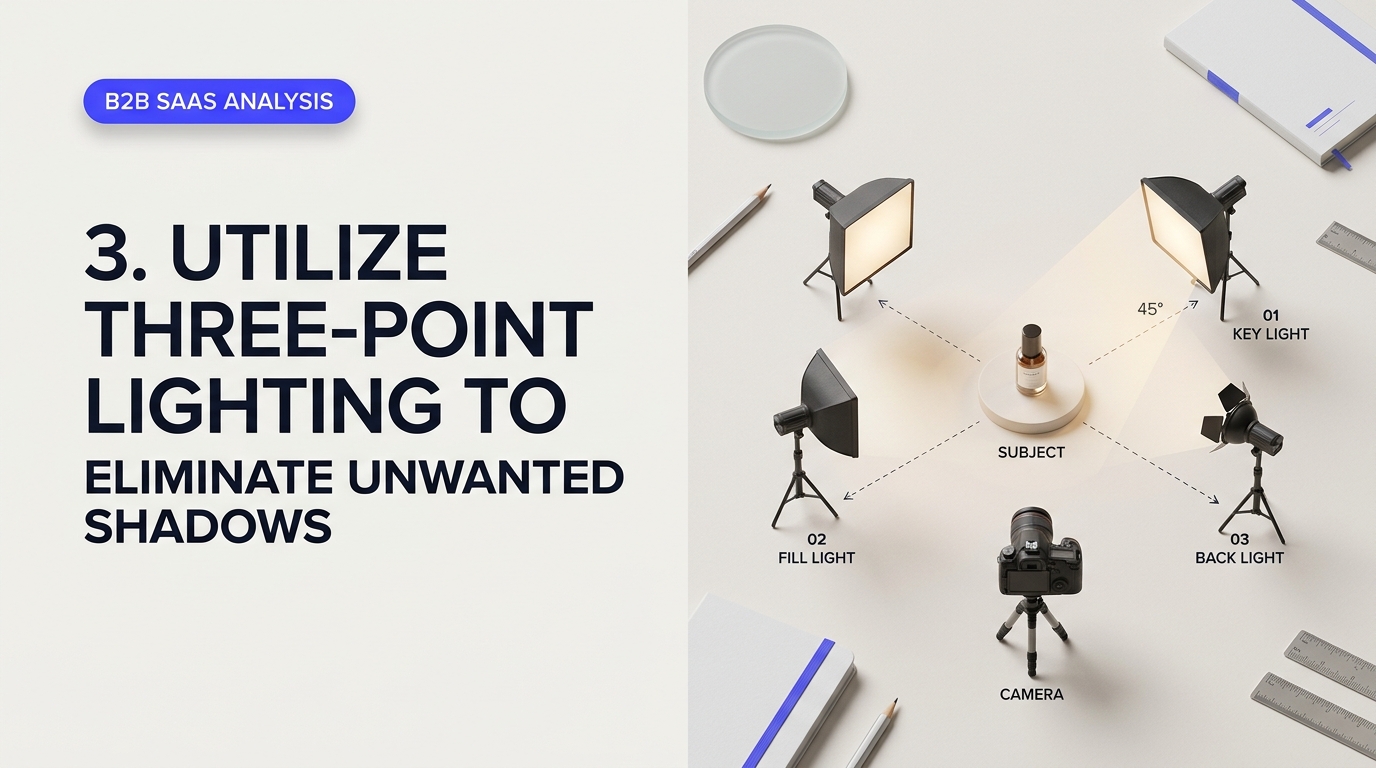
Perfect camera placement won't fix bad lighting. Muddy shadows instantly ruin high-converting eCommerce product images. When light hits an object unevenly, natural colors shift and fine surface textures disappear entirely under dark patches. Mastering a standard three-point studio setup gives you full control over highlights and dark spots, turning ordinary physical snapshots into crisp, commercial-grade assets.
Continuous LEDs vs. Studio Strobes for Creative product Photo Work
Lighting gear falls into two main categories. Continuous LED panels emit steady, constant illumination. What you see on your camera preview screen matches your final image frame. Beginners love continuous fixtures like the Godox SL60W LED light because adjusting light placement shows shadow changes instantly.
Strobe flash units release sudden, powerful bursts of light. Strobes overpower ambient room light easily. They let you freeze micro-movements, but they require wireless camera triggers and trial-and-error testing. Strobes demand a steeper learning curve than LED panels.
LED fixtures cost less upfront. They speed up physical framing. Strobes offer higher color rendering index (CRI 98+) scores and stronger brightness for tiny lens openings. Choose continuous LEDs for quick tabletop setups, or step up to strobes like Elinchrom D-Lite strobes for large studio shoots requiring maximum sharpness.
The Anatomy of a High-Impact Three-Point Setup
Setting up three lights transforms flat objects into dimensional products. Position each fixture intentionally around your shooting space to sculpt physical edges.
| Light Source | Position & Angle | Power Output | Primary Purpose |
|---|---|---|---|
| Key Light | 45 degrees to the left or right of camera | 100% (Base illumination) | Establishes main shape, surface texture, and dominant highlight. |
| Fill Light | Opposite side of Key Light, near camera axis | 30% to 50% of Key Light | Softens deep shadows created by key light without creating new cast shadows. |
| Back / Rim Light | Behind product, elevated at 45 degrees | 50% to 75% of Key Light | Separates dark product edges from backdrop paper to build 3D depth. |
Attach softboxes to your key and fill fixtures. Large softbox diffusion covers transform harsh point light into broad, sweeping continuous waves. This softens harsh shadow edges and fills microscopic surface gaps evenly across your item.
Taming Reflections and Preserving Color Accuracy
Glossy plastic, polished metal, and glass create frustrating glare spots. Pointing bare studio lights at metallic surfaces produces blown-out white spots that hide brand logos. It makes products look cheap.
Diffusing your light source fixes specular reflections. Place a translucent nylon diffusion sheet or white foam board between your softbox and the object. Direct light turns into a gentle, soft beam.
"Controlling your fill light ratio is the fastest way to turn flat tabletop photos into dimensional catalog assets."
Authentic color rendering relies on matching color temperatures. Set all continuous LED panels to 5500K daylight balance. Mixing warm ambient household bulbs with cool daylight studio lights creates yellow or blue color casts that confuse online shoppers.
E-commerce store owners frequently debate physical lighting investments against automated visual generation tools. Read through store owner forum benchmarks on lighting alternatives to see how physical setups compare with software platforms like Pebblely. Physical setups take space and setup time, but hands-on control delivers authentic material textures that build shopper confidence.